See the fix before you pay
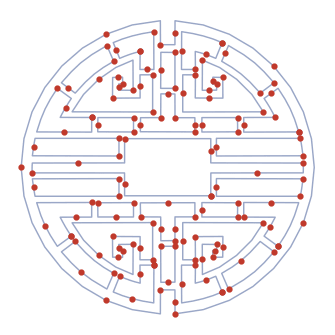
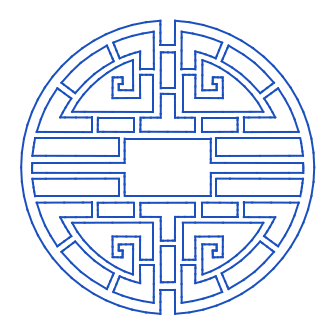
A real problem DXF, and the same file after cleanup — splines flattened, gaps closed, duplicates removed.
Deterministic — the same input always produces the same clean R12 output.
Flatten splines, close gaps, remove duplicates, and fix unit mismatches in one pass. Upload a problem DXF, preview the cleaned result free, and download clean R12 LINE geometry that machine controllers accept without complaint.
A real problem DXF, and the same file after cleanup — splines flattened, gaps closed, duplicates removed.
Deterministic — the same input always produces the same clean R12 output.
The problems that make a file look fine on screen but fail on the machine.
Flattens curves to simple LINE geometry that older and budget controllers accept without choking.
Detects and removes doubled-up lines and zero-length entities that cause double cuts and burnt edges.
Closes sub-millimetre gaps so shapes fill and cut as continuous paths.
Fixes unit-conversion errors so your part imports at the right size the first time.
Re-sequences moves to reduce unnecessary travel between cuts.
LINE-only R12 DXF designed for broad CNC, laser, plasma, plotter, and waterjet compatibility.
Every entity in your DXF is read individually — lines, arcs, polylines, splines. Nothing is rasterized or approximated behind your back. What you approve in the free preview is exactly what you download.
Upload, process, and inspect the result — including the toolpath emulation — before spending a token. Download only when the output looks right for your workflow.
Usually it’s splines, unclosed polylines, or duplicate lines. DXF Studio flattens splines and arcs to LINE geometry, closes gaps, and removes duplicates, then exports clean R12 DXF that imports cleanly.
It flattens splines and arcs to LINE entities, removes duplicate and zero-length geometry, closes open polylines, and fixes unit-conversion mismatches — in one pass.
Clean, simple LINE-based geometry in optimized cutting order, designed for broad compatibility with CNC, laser, plasma, plotter, and waterjet controllers, including older and budget controllers.
Yes. Processing uses fixed geometry rules, not AI, so the same input file always produces the same cleaned output.
No. The preview is always free — inspect the cleaned geometry and toolpath emulation before spending a token. Failed conversions never cost a token.